How to Get Another Process Memory in C#
This article aims to show you how to read/write a process' memory using C# and some methods found in kernel32.dll. This is a good way to learn a part of WinAPI and also understand the basics of memory allocation.
Before starting, we need a "target" - I choose notepad.exe but every native application is good for this.
1. Finding the Memory Address
As you might probably know, applications store each variable's value at a specific memory address, we need to know that memory address in order to edit anything. Since there's no other way around (or I'm not aware of it?), the only solution is to start searching, using a debugger.
To get that memory address, I used OllyDbg - don't worry, all the steps are written below.
First, open notepad.exe , type some text (like "hello world") and attach OllyDbg (File->Attach). Press F9 and then ALT+M to open the Memory Map.
It should look like this:
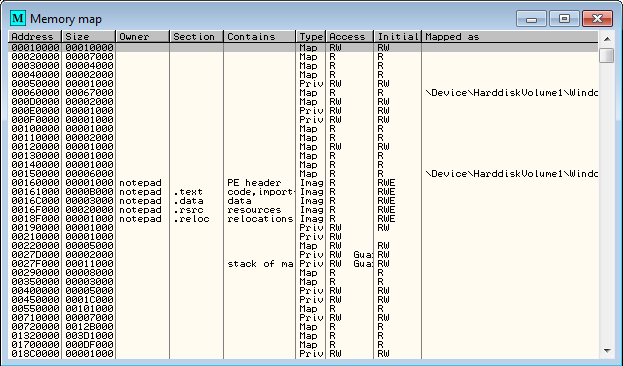
Press CTRL+B and it will open the Binary Search Window. Now, because the value is stored in memory as Unicode, you have to type the string you're looking for in the 2nd textbox:

Once you hit Ok, another window will pop up - the Memory Dump. Here, look at the very first memory address (on the left) - from that address, we'll start reading. In the image below, the highlighted part contains the message I typed in Notepad.
Note: Don't use the memory address from the image - it's not the same memory address every time.

We got the memory address, now...don't close/restart the application. If you restart it, the memory for the text will be reallocated, so the address will most likely be changed.
2. Read Process' Memory
In order to read the value from that memory address, we need to import 2 functions into C#: OpenProcess() and ReadProcessMemory() from kernel32.dll.
[ DllImport(" kernel32.dll")] public static extern IntPtr OpenProcess(int dwDesiredAccess, bool bInheritHandle, int dwProcessId); [DllImport(" kernel32.dll")] public static extern bool ReadProcessMemory(int hProcess, int lpBaseAddress, byte[] lpBuffer, int dwSize, ref int lpNumberOfBytesRead);
When a process is opened, you must also specify the desired access (this time, you request access for reading the memory), so this constant is needed:
const int PROCESS_WM_READ = 0x0010;
Since the whole code is self explanatory, I'll just add short comments where they're needed:
using System; using System.Diagnostics; using System.Runtime.InteropServices; using System.Text; public class MemoryRead { const int PROCESS_WM_READ = 0x0010; [DllImport(" kernel32.dll")] public static extern IntPtr OpenProcess(int dwDesiredAccess, bool bInheritHandle, int dwProcessId); [DllImport(" kernel32.dll")] public static extern bool ReadProcessMemory(int hProcess, int lpBaseAddress, byte[] lpBuffer, int dwSize, ref int lpNumberOfBytesRead); public static void Main() { Process process = Process.GetProcessesByName(" notepad")[0]; IntPtr processHandle = OpenProcess(PROCESS_WM_READ, false, process.Id); int bytesRead = 0; byte[] buffer = new byte[24]; ReadProcessMemory((int)processHandle, 0x0046A3B8, buffer, buffer.Length, ref bytesRead); Console.WriteLine(Encoding.Unicode.GetString(buffer) + " (" + bytesRead.ToString() + " bytes)"); Console.ReadLine(); } }
3. Write Process' Memory
Writing to a memory address is a little bit different: you'll need OpenProcess() and WriteProcessMemory().
[ DllImport(" kernel32.dll")] public static extern IntPtr OpenProcess(int dwDesiredAccess, bool bInheritHandle, int dwProcessId); [DllImport(" kernel32.dll", SetLastError = true)] static extern bool WriteProcessMemory(int hProcess, int lpBaseAddress, byte[] lpBuffer, int dwSize, ref int lpNumberOfBytesWritten);
However, special permissions are required: while opening the process, request the following access: PROCESS_VM_WRITE | PROCESS_VM_OPERATION.
const int PROCESS_VM_WRITE = 0x0020; const int PROCESS_VM_OPERATION = 0x0008;
Note: Notepad's textbox is storing the number of bytes it has to read from the memory - that value is updated only when the text is changed by user. If you write to the memory address a longer string, it will be truncated.
The complete code is available below:
using System; using System.Diagnostics; using System.Runtime.InteropServices; using System.Text; public class MemoryRead { const int PROCESS_VM_WRITE = 0x0020; const int PROCESS_VM_OPERATION = 0x0008; [DllImport(" kernel32.dll")] public static extern IntPtr OpenProcess(int dwDesiredAccess, bool bInheritHandle, int dwProcessId); [DllImport(" kernel32.dll", SetLastError = true)] static extern bool WriteProcessMemory(int hProcess, int lpBaseAddress, byte[] lpBuffer, int dwSize, ref int lpNumberOfBytesWritten); public static void Main() { Process process = Process.GetProcessesByName(" notepad")[0]; IntPtr processHandle = OpenProcess(0x1F0FFF, false, process.Id); int bytesWritten = 0; byte[] buffer = Encoding.Unicode.GetBytes(" It works!\0"); WriteProcessMemory((int)processHandle, 0x0046A3B8, buffer, buffer.Length, ref bytesWritten); Console.ReadLine(); } }
How to Get Another Process Memory in C#
Source: https://www.codeproject.com/Articles/670373/Csharp-Read-Write-Another-Process-Memory#:~:text=Press%20F9%20and%20then%20ALT%2BM%20to%20open%20the%20Memory%20Map.&text=Once%20you%20hit%20Ok%2C%20another,%2C%20we'll%20start%20reading.

Post a Comment for "How to Get Another Process Memory in C#"